# Appendix
Additional information and thoughts for the future.
# Things to Look Into
- [https://picovoice.ai/blog/whisper-cpp-speaker-diarization/](https://picovoice.ai/blog/whisper-cpp-speaker-diarization/)
> [OpenAI Whisper](https://openai.com/index/whisper/) delivers highly accurate speech-to-text transcription, but it does not track speaker changes. Applications that rely on Whisper cannot determine *who* is speaking in a conversation. To add [speaker labels](https://picovoice.ai/blog/speech-to-text-features/) such as "Speaker 1" and "Speaker 2," you can integrate [Falcon Speaker Diarization](https://picovoice.ai/platform/falcon/) with [whisper.cpp. creating a fully local, offline, multi-speaker transcription system.](https://github.com/ggml-org/whisper.cpp)
>
> This tutorial explains how to add speaker segmentation to Whisper, so you can determine "who spoke when" and generate timestamps to produce labeled Whisper transcripts suitable for multi-speaker recordings. This approach is ideal for use cases such as [podcast transcriptions](https://picovoice.ai/blog/new-era-for-podcast-publishers/), [meeting transcription and summarization](https://picovoice.ai/use-cases/meeting-transcription/), or [call center analytics](https://picovoice.ai/blog/challenges-of-call-centers/), where speaker identification is essential for readability and downstream analysis.
---
- [https://github.com/av/harbor](https://github.com/av/harbor)
Doesn't work with whisper.cpp? Would have been an interesting option.
> Harbor is a CLI and companion app that lets you spin up a complete local LLM stack—backends like Ollama, llama.cpp, or vLLM, frontends like Open WebUI, plus supporting services like SearXNG for web search, Speaches for voice chat, and ComfyUI for image generation—all pre-wired to work together with a single `harbor up` command. No manual setup: just pick the services you want and Harbor handles the Docker Compose orchestration, configuration, and cross-service connectivity so you can focus on actually using your models.
---
- LocalAI [https://localai.io/](https://localai.io/)
This will definitely be a starting point on better hardware.
---
- whisper-diarization might make discerning the speaker possible
---
Possible better(?) model for German? (Definitely not feasible on a Raspberry Pi 500)
[https://huggingface.co/primeline/whisper-large-v3-german](https://huggingface.co/primeline/whisper-large-v3-german)
# System Information
This page was part of the project write-up I mainly did for myself and is kept for reference.
### Device
| **Device Name** | Cox |
|---|
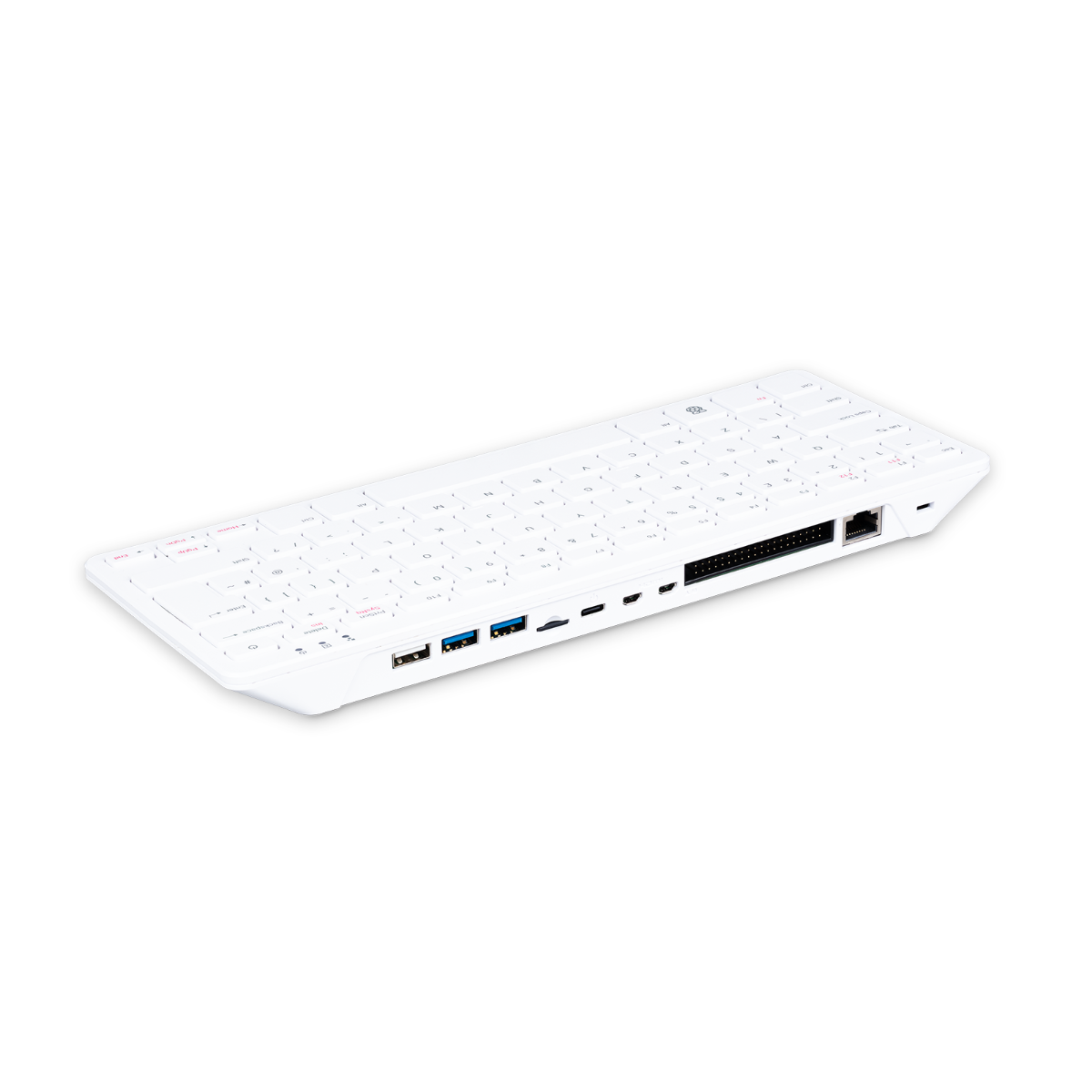
| **Device Type** | Raspberry Pi 500 DE Version |
|---|
### 
### Networking
| **Address** | **Type** |
| 10.20.0.94
| Wi-Fi |
|
| Ethernet |
### Hardware
| **Name** | **Type** | **Notes** |
|---|
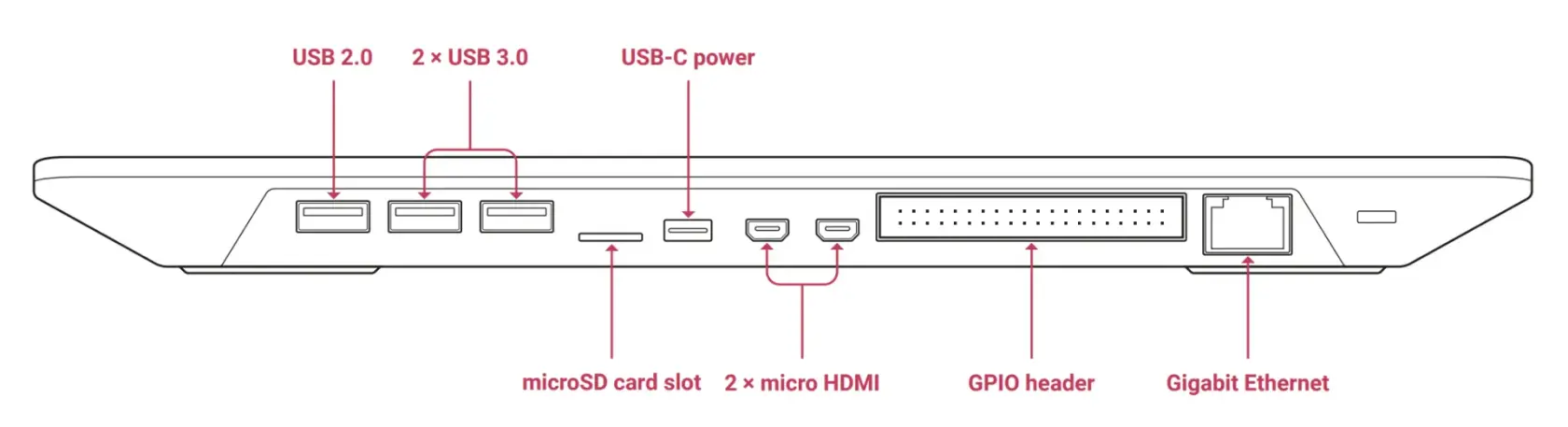
| **Device** | Raspberry Pi 500 | Single Circuit Board Computer integrated into a keyboard casing. German language keyboard variant. |
|---|
| **Processor** | Quad-core 64-bit Arm Cortex-A76 |
|
|---|
| **Memory** | 8GB | PDDR4X SDRAM |
|---|
| **Storage** | MicroSD Card: 32GB | Raspberry Pi A2-Class MicroSD Card
Pre-programmed with Raspberry Pi OS
|
|---|
| **Display** | Raspberry Pi Monitor 15.6" |
|
|---|
| **Sound In/Out** | Bluetooth Headset |
|
|---|
[](https://info.zusammenkunft.net/uploads/images/gallery/2026-01/image1-5.webp)
### Software
At the time of first installation/writing
| **Name** | **Description** | **Notes** |
|---|
| **OS** | Raspberry Pi OS - Debian GNU/Linux 13 (trixie)
|
|
| **Sound** | PulseAudio (on PipeWire 1.4.2)
|
|
| **libsdl2-dev**
| 2.32.4+dfsg-1
|
|
| **pulseaudio-utils** | 17.0+dfsg1-2+rpt1
|
|
| **ffmpeg**
| version 7.1.3-0+deb13u1+rpt1
|
|
| **whisper.cpp** | [v1.8.2](https://github.com/ggml-org/whisper.cpp/releases/tag/v1.8.1) (2025-10-15) | Port of OpenAI's Whisper model in C/C++ (MIT Licence) |
| **Model** | ggml-base.bin ggml-tiny.en.bin
|
|
| **ollama**
|
|
|
| **Models** |
|
|
| **tmux** | 3.5a-3
|
|
| **build-essential**
| 12.12
|
|
| **git**
| 1:2.47.3-0+deb13u1
|
|
| **cmake**
| 3.31.6-2
|
|
| **Legcord**
| 1.2.1
stable 499788 (c55be3e)
| Build Override: N/A
Vencord dc25c8f (Web)
Electron 40.1.0
Chromium 144 |
#### ffmpeg
ffmpeg
```bash
ffmpeg version 7.1.3-0+deb13u1+rpt1 Copyright (c) 2000-2025 the FFmpeg developers
built with gcc 14 (Debian 14.2.0-19)
configuration: --prefix=/usr --extra-version=0+deb13u1+rpt1 --toolchain=hardened --incdir=/usr/include/aarch64-linux-gnu \
--enable-gpl --disable-stripping --disable-libmfx --disable-mmal --disable-omx --enable-gnutls --enable-libaom \
--enable-libass --enable-libbs2b --enable-libcdio --enable-libcodec2 --enable-libdav1d --enable-libflite \
--enable-libfontconfig --enable-libfreetype --enable-libfribidi --enable-libglslang --enable-libgme \
--enable-libgsm --enable-libharfbuzz --enable-libmp3lame --enable-libmysofa --enable-libopenjpeg \
--enable-libopenmpt --enable-libopus --enable-librubberband --enable-libshine --enable-libsnappy --enable-libsoxr \
--enable-libspeex --enable-libtheora --enable-libtwolame --enable-libvidstab --enable-libvorbis --enable-libvpx \
--enable-libwebp --enable-libx265 --enable-libxml2 --enable-libxvid --enable-libzimg --enable-openal \
--enable-opencl --enable-opengl --disable-sndio --disable-libvpl --libdir=/usr/lib/aarch64-linux-gnu \
--arch=arm64 --enable-neon --enable-v4l2-request --enable-libudev --enable-epoxy --enable-libdc1394 \
--enable-libdrm --enable-libiec61883 --enable-vout-drm --enable-chromaprint --enable-frei0r --enable-ladspa \
--enable-libbluray --enable-libcaca --enable-libdvdnav --enable-libdvdread --enable-libjack --enable-libpulse \
--enable-librabbitmq --enable-librist --enable-libsrt --enable-libssh --enable-libsvtav1 --enable-libx264 \
--enable-libzmq --enable-libzvbi --enable-lv2 --enable-sand --enable-sdl2 --enable-libplacebo --enable-librav1e \
--enable-pocketsphinx --enable-librsvg --enable-libjxl --enable-shared
libavutil 59. 39.100 / 59. 39.100
libavcodec 61. 19.101 / 61. 19.101
libavformat 61. 7.100 / 61. 7.100
libavdevice 61. 3.100 / 61. 3.100
libavfilter 10. 4.100 / 10. 4.100
libswscale 8. 3.100 / 8. 3.100
libswresample 5. 3.100 / 5. 3.100
libpostproc 58. 3.100 / 58. 3.100
```
pactl
```
Server String: /run/user/1000/pulse/native
Library Protocol Version: 35
Server Protocol Version: 35
Is Local: yes
Client Index: 77
Tile Size: 65472
User Name: mela
Host Name: Cox
Server Name: PulseAudio (on PipeWire 1.4.2)
Server Version: 15.0.0
Default Sample Specification: float32le 2ch 48000Hz
Default Channel Map: front-left,front-right
Default Sink: auto_null
Default Source: auto_null.monitor
Cookie: 56a6:8e1c
```
Pipewire
```bash
mela@Cox:~ $ systemctl --user status pipewire pipewire-pulse wireplumber --no-pager
● pipewire.service - PipeWire Multimedia Service
Loaded: loaded (/usr/lib/systemd/user/pipewire.service; enabled; preset: enabled)
Active: active (running) since Wed 2026-01-07 17:21:03 CET; 3 days ago
Invocation: d54a55bb3ef54b47b454d6cb42d5e273
TriggeredBy: ● pipewire.socket
Main PID: 1334 (pipewire)
Tasks: 3 (limit: 9571)
CPU: 34ms
CGroup: /user.slice/user-1000.slice/user@1000.service/session.slice/pipewire.service
└─1334 /usr/bin/pipewire
Jan 07 17:21:03 Cox systemd[1301]: Started pipewire.service - PipeWire Multimedia Service.
Jan 07 17:21:04 Cox pipewire[1334]: mod.rt: RTKit error: org.freedesktop.DBus.Error.Servi…nknown
Jan 07 17:21:04 Cox pipewire[1334]: mod.rt: RTKit does not give us MaxRealtimePriority, using 1
Jan 07 17:21:04 Cox pipewire[1334]: mod.rt: RTKit error: org.freedesktop.DBus.Error.Servi…nknown
Jan 07 17:21:04 Cox pipewire[1334]: mod.rt: RTKit does not give us MinNiceLevel, using 0
Jan 07 17:21:04 Cox pipewire[1334]: mod.rt: RTKit error: org.freedesktop.DBus.Error.Servi…nknown
Jan 07 17:21:04 Cox pipewire[1334]: mod.rt: RTKit does not give us RTTimeUSecMax, using -1
● pipewire-pulse.service - PipeWire PulseAudio
Loaded: loaded (/usr/lib/systemd/user/pipewire-pulse.service; enabled; preset: enabled)
Active: active (running) since Wed 2026-01-07 17:21:03 CET; 3 days ago
Invocation: 1e32511184954e5d9e8903b4482f4731
TriggeredBy: ● pipewire-pulse.socket
Main PID: 1345 (pipewire-pulse)
Tasks: 3 (limit: 9571)
CPU: 27ms
CGroup: /user.slice/user-1000.slice/user@1000.service/session.slice/pipewire-pulse.service
└─1345 /usr/bin/pipewire-pulse
Jan 07 17:21:03 Cox systemd[1301]: Started pipewire-pulse.service - PipeWire PulseAudio.
Jan 07 17:21:04 Cox pipewire-pulse[1345]: mod.rt: RTKit error: org.freedesktop.DBus.Error.…known
Jan 07 17:21:04 Cox pipewire-pulse[1345]: mod.rt: RTKit does not give us MaxRealtimePriori…ing 1
Jan 07 17:21:04 Cox pipewire-pulse[1345]: mod.rt: RTKit error: org.freedesktop.DBus.Error.…known
Jan 07 17:21:04 Cox pipewire-pulse[1345]: mod.rt: RTKit does not give us MinNiceLevel, using 0
Jan 07 17:21:04 Cox pipewire-pulse[1345]: mod.rt: RTKit error: org.freedesktop.DBus.Error.…known
Jan 07 17:21:04 Cox pipewire-pulse[1345]: mod.rt: RTKit does not give us RTTimeUSecMax, using -1
● wireplumber.service - Multimedia Service Session Manager
Loaded: loaded (/usr/lib/systemd/user/wireplumber.service; enabled; preset: enabled)
Active: active (running) since Wed 2026-01-07 17:21:03 CET; 3 days ago
Invocation: a5b8a90d609d4ec7a9111718a22690c1
Main PID: 1342 (wireplumber)
Tasks: 9 (limit: 9571)
CPU: 183ms
CGroup: /user.slice/user-1000.slice/user@1000.service/session.slice/wireplumber.service
└─1342 /usr/bin/wireplumber
Jan 07 17:21:03 Cox systemd[1301]: Started wireplumber.service - Multimedia Service Sessi…nager.
Jan 07 17:21:04 Cox wireplumber[1342]: mod.rt: RTKit error: org.freedesktop.DBus.Error.Se…nknown
Jan 07 17:21:04 Cox wireplumber[1342]: mod.rt: RTKit does not give us MaxRealtimePriority…sing 1
Jan 07 17:21:04 Cox wireplumber[1342]: mod.rt: RTKit error: org.freedesktop.DBus.Error.Se…nknown
Jan 07 17:21:04 Cox wireplumber[1342]: mod.rt: RTKit does not give us MinNiceLevel, using 0
Jan 07 17:21:04 Cox wireplumber[1342]: mod.rt: RTKit error: org.freedesktop.DBus.Error.Se…nknown
Jan 07 17:21:04 Cox wireplumber[1342]: mod.rt: RTKit does not give us RTTimeUSecMax, using -1
Jan 07 17:21:04 Cox wireplumber[1342]: wp-internal-comp-loader: Loading profile 'main'
Jan 07 17:21:04 Cox wireplumber[1342]: default: Failed to get percentage from UPower: org…oOwner
Jan 07 17:21:04 Cox wireplumber[1342]: [0:00:08.569845993] [1342] INFO Camera camera_man…251202
Hint: Some lines were ellipsized, use -l to show in full.
```
If you want to recreate TranscriptOMatic on a system different from a Raspberry Pi 500, you will need to find out the right devices and names on your own. This was my approach, that might give you an idea where to start finding the right settings for your environment:
##### Finding the System's Audio Sinks
Checking for the system's audio sinks:
```bash
pactl list short sinks
```
The result should look something like this:
```bash
mela@Cox:~ $ pactl list short sinks
35 auto_null PipeWire float32le 2ch 48000Hz SUSPENDED
```
##### Finding the Discord Sound Device
After joining a Discord voice channel, checking for the Discord system sound device:
```bash
pactl list short sink-inputs
```
The result should be something like:
```bash
mela@Cox:~ $ pactl list short sink-inputs
184 35 183 PipeWire float32le 2ch 48000Hz
```
##### Adding a Persistent Sink (And Using Its Monitor as a Stable Audio Source).
Create a dedicated null sink for Discord audio:
```bash
pactl load-module module-null-sink \
sink_name=discord_sink \
sink_properties=device.description=DiscordSink
```
After joining a Discord voice channel, the sink-input may disappear quickly if the channel is silent. To immediately move the active sink-input to the persistent sink:
```bash
pactl move-sink-input $(pactl list short sink-inputs | awk '{print $1}') discord_sink
```
This assumes that only a single sink-input is active, which is a reasonable assumption in a minimal setup, but may not hold true on a typical desktop system.
Controlling the result:
```bash
pactl list short sinks
```
The result should look something like this: `IDLE` instead of `SUSPENDED`.
`IDLE` means the sink exists persistently but currently receives no audio data.
```bash
mela@Cox:~ $ pactl list short sinks
199 discord_sink PipeWire float32le 2ch 48000Hz IDLE
```
Getting the sound monitor source:
```bash
pactl list short sources
```
The result should look something like this:
```bash
mela@Cox:~ $ pactl list short sources
199 discord_sink.monitor PipeWire float32le 2ch 48000Hz IDLE
```
##### Changing `meeting-start` to Reflect Your Environment
Based on your results, change the relevant parts of meeting-start accordingly:
```bash
# 1) Ensure discord_sink exists
if ! pactl list short sinks | awk '{print $2}' | grep -qx "$DISCORD_SINK"; then
pactl load-module module-null-sink \
sink_name="$DISCORD_SINK" \
sink_properties=device.description=DiscordSink >/dev/null
fi
# 2) Try to move an active sink-input (Discord) to discord_sink
# This may be transient in silent channels → poll briefly.
moved="no"
for _ in {1..40}; do
SID="$(pactl list short sink-inputs 2>/dev/null | awk 'NF{print $1}' | head -n1 || true)"
if [[ -n "${SID:-}" ]]; then
if pactl move-sink-input "$SID" "$DISCORD_SINK" 2>/dev/null; then
moved="yes"
break
fi
fi
sleep 0.25
done
if [[ "$moved" != "yes" ]]; then
echo "⚠️ Could not move a sink-input to $DISCORD_SINK."
echo " Make sure Legcord is connected to a voice channel, then re-run meeting-start."
fi
# 3) Remove existing whisper_mic remap-sources (idempotent)
for mid in $(pactl list short modules | awk '$0 ~ /module-remap-source/ && $0 ~ /source_name=whisper_mic/ {print $1}'); do
pactl unload-module "$mid" >/dev/null 2>&1 || true
done
```
##### A Remapping Check
Under PipeWire, the master source of a remapped source may not be visible via pactl list sources. Successful capture via ffmpeg confirms correct wiring.
```bash
ffmpeg -f pulse -i whisper_mic -t 3 /tmp/whisper-mic-test.wav
ls -lh /tmp/whisper-mic-test.wav
```
A successful result:
```bash
-rw-rw-r-- 1 mela mela 565K Jan 11 07:23 /tmp/whisper-mic-test.wav
```
---
PipeWire may ignore rate=16000; resampling can be handled downstream (e.g., by ffmpeg or whisper.cpp).